ADC / DAC Converter Calculator
Convert between analog voltage and digital code for any N-bit ADC or DAC. Computes LSB size, quantisation error, full-scale range, and ideal dynamic range (SQNR).
Interactive tool
Result
What is the ADC / DAC Converter Calculator?
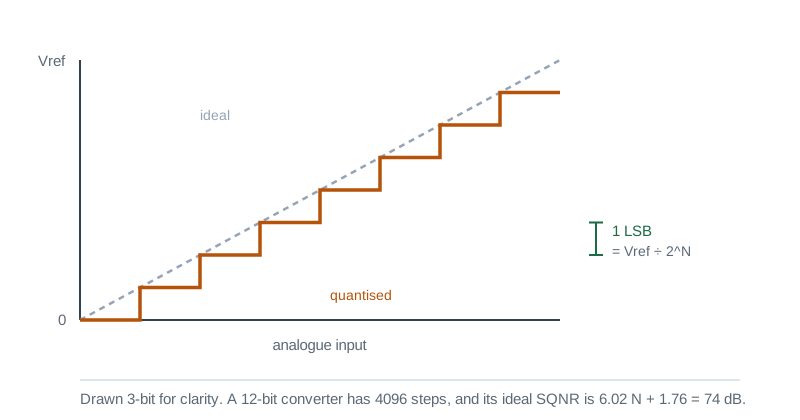
ADCs (analog-to-digital converters) map a continuous voltage onto a finite set of integer codes; DACs do the reverse. This tool gives you both directions for any common bit depth (4 to 24 bits) and any positive reference voltage, plus the auxiliary numbers you actually need: LSB size, quantisation error, full-scale, and ideal dynamic range.
How to Use the Calculator
- 1Pick ADC (voltage → code) or DAC (code → voltage)
- 2Choose a bit depth: common values are 8/10/12/16-bit; high-res audio uses 24-bit
- 3Enter Vref (the reference voltage of the converter: sets the input/output range)
- 4For ADC, enter the analog Vin; for DAC, enter the digital code in decimal
- 5Read off the digital code (or voltage) plus LSB, quantisation error, full-scale, and dynamic range
Key features
Both directions
ADC converts voltage to code; DAC converts code to voltage
Up to 24 bits
Supports 4, 6, 8, 10, 12, 14, 16, 18, 20, and 24-bit converters
Multiple representations
Digital code shown in decimal, binary, and hex
Quantisation error
Worst-case error is ± LSB / 2
Dynamic range (SQNR)
Ideal SQNR = 6.02·N + 1.76 dB
Vref presets
Common values: 1.024 V, 2.048 V, 2.5 V, 3.3 V, 5 V
Why a Dedicated ADC/DAC Calculator?
It is easy to confuse "full-scale" (= Vref·(2ᴺ−1)/2ᴺ, the largest representable voltage) with Vref itself. The difference matters when matching sensor outputs to the ADC range: putting 3.30 V into a 3.30 V ADC clips at code 2ᴺ−1; for clean conversion you should aim slightly below Vref. This tool surfaces full-scale and clipping explicitly.
Common use cases
- Pick an ADC bit depth from required precision (e.g., 1 mV resolution on a 5 V range needs ≥ 13 bits)
- Compute the smallest detectable change for a 12-bit microcontroller ADC
- Compare quantisation noise of a 16-bit vs 24-bit audio DAC
- Match a sensor output to an ADC input range
- Translate raw ADC counts back to physical units (voltage, current, temperature)
- Estimate the SNR ceiling of a high-resolution data acquisition channel
Core formulas
- LSB = Vref / 2ᴺ
- Full-scale = (2ᴺ − 1) · LSB
- Quantisation error (worst case) = ± LSB / 2
- Digital code (ADC) = floor(Vin / LSB), clipped to [0, 2ᴺ − 1]
- Output voltage (DAC) = code · LSB
- Ideal dynamic range (SQNR, dB) = 6.02·N + 1.76
Typical resolutions
- 8-bit: 256 levels (Arduino LED dimming, simple sensors)
- 10-bit: 1024 levels (classic AVR/PIC microcontroller ADC)
- 12-bit: 4096 levels (STM32, RP2040, ESP32-S3 ADC)
- 16-bit: 65,536 levels, high-resolution sensors, audio (CD-quality)
- 24-bit: 16 million levels (pro audio, precision instrumentation)
Practical caveats
- Real ADC ENOB (effective number of bits) is always less than the nominal N
- INL/DNL specs in the datasheet bound non-ideal behaviour
- Source impedance, sampling time, and Vref noise all degrade the result
- For DC measurements, oversampling and averaging can recover ~1 extra bit per 4× samples
Tips & best practices
Use the right Vref
A lower Vref shrinks LSB → finer resolution, but also reduces input range. Match Vref to your signal range when possible.
Anti-alias
Always low-pass filter before an ADC at less than fs/2. Sampling theorem is non-negotiable.
Don’t expect 24 bits of accuracy from a 24-bit ADC
Even the best 24-bit ΔΣ ADCs deliver around 20 to 22 ENOB in real conditions. The last bits are usually noise.
Privacy & security
All calculations are performed in your browser.
Related tools
- Voltage Drop Calculator
NEC voltage drop calculator. Enter system, voltage, current, one-way length and conductor, and get volts dropped, percent drop, voltage at the load and the smallest conductor that meets your target.
Electronics & Embedded
- Conduit Fill Calculator
NEC Chapter 9 conduit-fill calculator. Pick conduit type and trade size, add cables (THHN/THWN/XHHW by AWG), and get utilisation, NEC limit, and pass/fail.
Electronics & Embedded
- Resistor Color Code Decoder
Decode and encode 3, 4, 5, and 6-band resistor color codes. Pick colors to read the value, or enter a value to see the matching color bands.
Electronics & Embedded
- LED Resistor Calculator
Size the current-limiting resistor for a single LED, an LED chain in series, or several LEDs in parallel. Picks the nearest standard E-series value and recommends a safe wattage rating.
Electronics & Embedded
- Motor Full Load Current Calculator
Compute motor full-load current (FLA / FLC) for DC, single-phase, and three-phase motors from horsepower or kilowatts, efficiency, and power factor. Side-by-side NEC 430.250 reference.
Electronics & Embedded
- Ohm’s Law Calculator
Solve Ohm’s law for voltage, current, resistance, or power. Enter any two of V, I, R, and P and instantly get the other two with step-by-step derivations.
Electronics & Embedded
Frequently Asked Questions
What is the LSB of an ADC?
The least significant bit (LSB) is Vref / 2ᴺ: the voltage represented by a single-count change in the digital code. For a 12-bit ADC with Vref = 3.3 V, one LSB is 3.3 / 4096 ≈ 0.806 mV.
How is dynamic range computed?
Ideal SQNR (signal-to-quantisation-noise ratio) for a full-scale sine into an N-bit converter is 6.02·N + 1.76 dB. Real ADCs achieve less than this because of thermal noise, INL/DNL, and aperture jitter. The figure is a theoretical ceiling.
Why is the maximum digital code 2^N - 1, not 2^N?
An N-bit converter has 2ᴺ distinct levels but the highest valid code is 2ᴺ − 1 (the all-ones code), which maps to (2ᴺ − 1)·LSB, just below Vref. This is the converter’s full-scale value.
What is quantisation error?
When a continuous voltage is rounded to the nearest code, the worst-case absolute error is half an LSB. Averaged across uniform inputs, the RMS quantisation noise is LSB / √12.
What if my input exceeds Vref?
The converter saturates at code 2ᴺ − 1 (for the ADC) or at full-scale voltage (for the DAC). This calculator highlights the clipping condition so you can re-scale your signal or pick a higher Vref.
Is anything sent to a server?
No. All math runs in your browser. No data is uploaded.