Resistor Color Code Decoder
Decode and encode 3, 4, 5, and 6-band resistor color codes. Pick colors to read the value, or enter a value to see the matching color bands.
Interactive tool
Pick band colors
Result
What is the Resistor Color Code Decoder?
Through-hole resistors use colored bands to encode their resistance value, tolerance, and (for precision parts) temperature coefficient. This tool decodes those bands into ohms, or runs the reverse: pick a value and tolerance and see which color sequence to look for on the part.
How to Use the Decoder
- 1Choose Decode (colors → value) or Encode (value → colors)
- 2Select the band count: 4-band (5% / 10% tolerance), 5-band (1% / 2%), or 6-band (precision + TCR)
- 3In Decode mode, pick the color of each band from the drop-down
- 4In Encode mode, enter the value in engineering notation (e.g. 4.7k) and pick a tolerance
- 5Read the value, the tolerance range, the nearest E96 standard value, and the visual resistor preview
Key features
Bidirectional
Decode colors to a value OR encode a value back to colors: round-trip safe for all standard combinations
3, 4, 5, 6 bands
3-band (20%), 4-band (5/10%), 5-band (1/2%), 6-band (precision + temperature coefficient)
Visual SVG preview
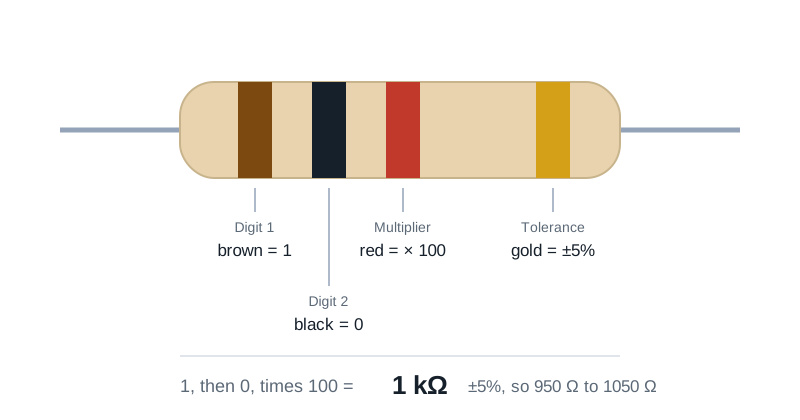
Inline resistor schematic with colored bands so you can match the physical part by eye
Tolerance range
Shows the min/max real-world resistance given the tolerance band
Nearest E96
Suggests the closest standard E96 value with the percent deviation: handy when you want a 1% replacement for a non-standard reading
100% private
All decoding runs in your browser; nothing is uploaded
Why a Dedicated Decoder?
Reading resistor color codes manually is the most common source of "I burned my LED" stories in electronics. The colors look similar under different lighting, the band order can be ambiguous on symmetric resistors (especially 4-band), and 5/6-band precision parts add a third digit that trips up muscle memory. A reference tool that shows the value, tolerance range, and a colored preview side by side eliminates both mis-reads and mis-encodings.
Common use cases
- Identify an unmarked resistor pulled from a junk drawer or old PCB
- Verify a kit’s bill of materials matches what you actually received
- Find the color sequence to order or stock a specific value
- Teach beginners how the color code works with a live visual
- Spot bad band orientation on a 4-band resistor (gold/silver always last)
Color code chart
- Black=0 · Brown=1 · Red=2 · Orange=3 · Yellow=4
- Green=5 · Blue=6 · Violet=7 · Gray=8 · White=9
- Gold = ×0.1 multiplier, 5% tolerance
- Silver = ×0.01 multiplier, 10% tolerance
- No band = 20% tolerance (3-band resistors)
Reading direction
Read from the band closest to the lead. On 4-band resistors the tolerance band (gold or silver) is almost always the last and is also visually distinct. On 5-band parts the gap before the tolerance band is usually larger than the gaps between the first four bands.
Tips & best practices
When in doubt, measure
A multimeter resolves all color-reading ambiguity in two seconds. Use this tool to verify the reading or order the right replacement.
Gold/silver are never digit bands
If you see a gold or silver band that is not at the end, the resistor is upside down: flip it.
Watch for SMD resistors
Surface-mount resistors use numeric codes, not colors. This tool is for through-hole axial-lead parts.
Privacy & security
Everything runs in your browser; no data leaves your device.
Related tools
- Voltage Drop Calculator
NEC voltage drop calculator. Enter system, voltage, current, one-way length and conductor, and get volts dropped, percent drop, voltage at the load and the smallest conductor that meets your target.
Electronics & Embedded
- RC Time Constant Calculator
Compute the time constant τ = R × C, plot the charge or discharge curve, and find the time to reach a target voltage for any RC circuit.
Electronics & Embedded
- Signal Attenuation (dB) Calculator
Convert between power / voltage ratios and dB, compute Free-Space Path Loss (FSPL), and estimate cable attenuation. Supports forward and reverse calculations.
Electronics & Embedded
- ADC / DAC Converter Calculator
Convert between analog voltage and digital code for any N-bit ADC or DAC. Computes LSB size, quantisation error, full-scale range, and ideal dynamic range (SQNR).
Electronics & Embedded
- Capacitor Charge & Energy Calculator
Compute the stored charge (Q = CV) and energy (E = ½ CV²) of a charged capacitor, with intuitive real-world comparisons.
Electronics & Embedded
- Unicode Converter
Convert text to and from Unicode escapes, code points, UTF-8 hex bytes, and Unicode normalization forms
Encoding Tools
Frequently Asked Questions
Which end of the resistor do I start reading from?
Start from the band closest to a lead. The tolerance band (gold or silver on 4-band, brown/red/green/blue/violet/gray on 5/6-band) is at the opposite end and is usually offset by a slightly larger gap. If you cannot tell, take a reading with a multimeter to disambiguate.
What is the difference between 4, 5, and 6-band resistors?
4-band: two value digits + multiplier + tolerance (usually 5% or 10%). 5-band: three value digits + multiplier + tolerance (typically 1% or 2%, precision parts). 6-band: 5-band plus a temperature coefficient (TCR) band, used for precision and metrology applications.
Why does my read-out not match my multimeter?
Color codes give a nominal value with a tolerance. A "1 kΩ 5%" resistor can legitimately measure anywhere from 950 Ω to 1050 Ω. If the meter reading is outside that range, double-check the band colors and orientation: the most common mistake is reading a 4-band resistor backwards.
What is the E96 series?
E96 is the standard series of 1% tolerance resistor values: 96 logarithmically spaced values per decade. When you decode an unusual value, the tool suggests the nearest E96 standard so you know what to actually order from a distributor.
Does this work for surface-mount (SMD) resistors?
No: SMD resistors use printed numeric codes (3-digit, 4-digit, or EIA-96 alphanumeric), not colored bands. This tool is for through-hole axial-lead parts.
Is anything sent to a server?
No. Everything happens in your browser. No band selections, values, or copies leave your device.