PDF to Image
Convert PDF pages to PNG or JPG images using pdf.js. rendered locally in your browser.
Interactive tool
What is PDF to image conversion?
Each PDF page is rendered to a bitmap, then exported as PNG or JPEG. This is ideal for thumbnails, slides, social previews, or pulling figures from a document without desktop software.
How to use
- 1Upload a PDF.
- 2Choose scale (higher = sharper, larger files), image format, and optional page range.
- 3Click Convert and download each generated image.
Key features
PNG or JPEG
Pick lossless PNG or smaller JPEG with quality control.
Adjustable scale
Scale affects resolution; try 2 for a good screen default.
Page range
Convert only the pages you need.
Client-side pdf.js
Rendering happens locally using Mozilla pdf.js.
Why convert PDF pages to images?
Images are easy to embed in presentations, CMSs, and chat apps. Rasterizing guarantees consistent appearance without requiring PDF viewers.
Common use cases
- Generate slide deck thumbnails
- Extract diagrams for documentation
- Share one page without sending the whole PDF
PNG or JPG, which to pick
- PNG is lossless and keeps transparency, so text and line art stay crisp at any scale. It is the right default for a page that is mostly type, tables or diagrams, which describes most PDFs.
- JPEG is lossy and much smaller on photographs, but it softens text edges and cannot hold transparency. Choose it when the page is a full bleed photograph and file size matters more than sharp lettering.
- If you are not sure, export PNG. A PDF page is usually type, and type is exactly what JPEG handles worst.
Choosing a scale
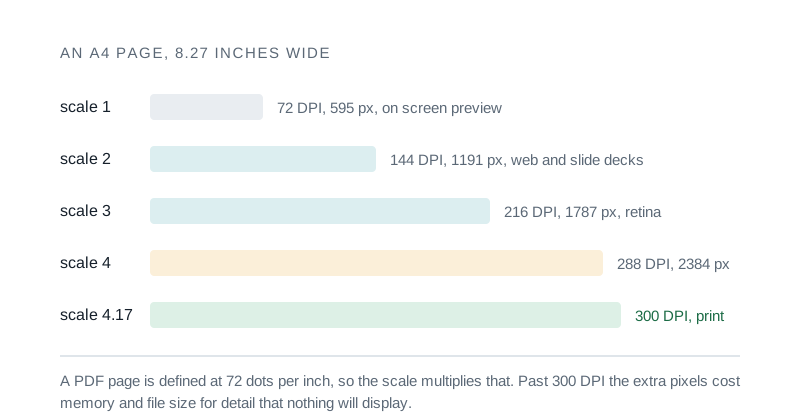
- Scale is a multiplier on the PDF native 72 dots per inch, so scale 2 renders at 144 DPI and scale 4 at 288. The table below turns that into pixel widths for a page of A4 or Letter size.
- Higher scales cost memory rather than quality beyond a point: once the raster is denser than the display or printer can show, the extra pixels are wasted and the file simply gets larger.
Performance
Large scales on long documents need more memory. Start with a small page range if you hit slowdowns.
Scale, resolution and what it is good for
A PDF page is defined at 72 dots per inch, so the scale you choose multiplies that. Widths below are for a portrait A4 page, which is 8.27 inches across.
| Scale | Resolution | Width in pixels | Good for |
|---|---|---|---|
| 1 | 72 DPI | 595 px | a quick on screen preview |
| 2 | 144 DPI | 1,191 px | web embedding and most slide decks |
| 3 | 216 DPI | 1,787 px | a large presentation or a retina display |
| 4 | 288 DPI | 2,384 px | close to print quality |
| 4.17 | 300 DPI | 2,480 px | true print resolution |
Letter size is slightly wider at 8.5 inches, so multiply these by 1.03. Above 300 DPI you are usually paying in memory and file size for detail nothing will display.
Tips & best practices
Text clarity
Use PNG for sharp text; JPEG may show compression artifacts on small type.
Privacy & security
pdf.js runs entirely in your browser. Your PDF is not uploaded to Zap.Tools.
Related tools
- PDF Compress
Shrink PDF file size by repacking and optimizing structure. runs locally in your browser.
PDF Tools
- PDF Merge & Split
Merge multiple PDFs into one or split a PDF by pages. All processing runs in your browser.
PDF Tools
- PDF OCR / Make Searchable
Recognize text in scanned PDFs using Tesseract.js, then extract it as plain text or rebuild a searchable PDF with an invisible text layer. All client-side.
PDF Tools
- PDF Rotate & Reorder
Rotate, reorder, and delete pages in a PDF visually with thumbnails. Drag pages to reorder, click to rotate or remove
PDF Tools
- 555 Timer Calculator
Design an NE555 astable oscillator or monostable one-shot. Pick R1, R2, C and read off frequency, period, duty cycle, and pulse width, with an inline schematic.
Electronics & Embedded
- Color Picker & Converter
Convert HEX, RGB, HSL, and CMYK. Check WCAG contrast between two colors.
Utilities
Frequently Asked Questions
Is PDF to PNG free?
Yes. Rendering uses pdf.js in your browser; there is no per-page fee or upload.
What is the scale option?
It multiplies the PDF page size in PDF units. Larger values produce higher-resolution images and more pixels.
Can I convert only one page?
Set first and last page to the same number, or set the range to a single page.
Does text stay selectable?
Exported files are images. text becomes pixels and is no longer selectable.
Are files uploaded?
No. Conversion is fully client-side.
Is converting PDF to PNG lossless?
The rendering itself is exact and PNG stores it without loss, so nothing is thrown away at the point of export. What limits quality is the scale you render at: a PDF page is vector, and once it becomes a bitmap it is fixed at whatever resolution you chose.
What resolution should I use for PDF to PNG?
Scale 2, which is 144 DPI, is a good default for screens and web embedding. Use scale 4 or above when the image will be printed, since print wants around 300 DPI. Going higher than that costs memory and file size for detail nothing will show.
Why use this instead of iLovePDF or Smallpdf?
Those services upload your document to their servers, queue it and hand back a result, which is a poor trade when the PDF is a contract, a payslip or a medical letter. This converter renders the pages in your own browser with pdf.js, so the file never leaves your machine.