Image Resizer
Resize images by exact pixels or percentage with optional aspect ratio lock.
Interactive tool
Why resize images?
Websites, forms, and APIs often require maximum width or height. Resizing keeps subjects recognizable while meeting pixel limits and reducing download size.
How to use
- 1Upload an image.
- 2Either enter target width and height, or use a percentage scale.
- 3Leave aspect lock on to avoid stretching (one dimension can be auto calculated).
- 4Download the resized file.
Key features
Pixel or percent
Resize by exact dimensions or uniform percentage.
Aspect ratio
Lock proportions when only width or height is set.
Browser canvas
Uses HTML Canvas. No server upload.
When to resize vs compress
Resizing reduces pixels; compression reduces bytes per pixel. Use both when photos are too large in dimensions and file size.
Common use cases
- Avatar and profile picture constraints
- Product thumbnails
- Banner templates
Why upscaling does not add detail
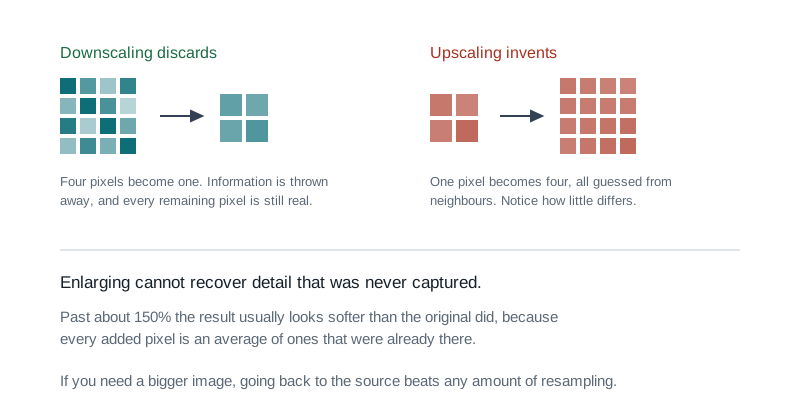
- Enlarging an image invents pixels by interpolating between the ones that exist. It can make a picture bigger, but it cannot recover detail that was never captured, and past about 150% the result usually looks softer than the original did.
- If you need a larger image, going back to the source at a higher resolution beats any amount of resampling.
- Downscaling is the opposite: it genuinely discards information and almost always looks good, which is why reducing dimensions is such an effective way to shrink a file.
Aspect ratio, and the two ways to change it
- Locking the aspect ratio keeps the proportions, so setting one dimension derives the other. This is what you want almost always, because unlocking it stretches faces and circles in a way that reads as wrong even to people who cannot say why.
- When an image genuinely has to fit a different shape, crop rather than stretch. Cropping loses part of the picture but keeps everything that remains looking correct.
Tips & best practices
Resize for the largest place it appears
Pick the dimensions from the biggest slot the image occupies, then let CSS scale it down for smaller screens. Sizing for the average leaves it soft on desktop.
Double it for retina screens
A 600 pixel wide slot on a high density display wants a 1200 pixel image. Beyond twice, the extra pixels cost bandwidth and show nothing.
Resize once, from the original
Each resample softens the image slightly. Going 4000 to 2000 to 800 looks worse than going 4000 straight to 800.
Check the aspect ratio before you commit
Unlocking the ratio to force a shape stretches faces and circles in a way readers notice even when they cannot name it. Crop instead.
Resize before compressing, not after
Dropping the dimensions removes pixels outright, which shrinks a file far more cleanly than pushing the quality slider down at full size.
Privacy & security
Images are processed locally in your browser.
Related tools
- Image Compressor
Reduce image file size with quality and dimension controls. all in your browser.
Image Tools
- Image Format Converter
Convert images between PNG, JPEG, and WebP with quality control. in your browser.
Image Tools
- Image Cropper
Crop, rotate, and flip images with aspect ratio presets. Supports PNG, JPEG, and WEBP output with adjustable quality
Image Tools
- EXIF Metadata Remover
Strip EXIF, GPS, and other hidden metadata from photos before sharing them online: lossless for JPEG, batch zip download
Image Tools
- PDF to Text
Extract every word from a PDF as plain text or structured JSON. 100% browser-side using pdfjs-dist. No upload, no signup.
PDF Tools
- PDF Watermark
Add text or image watermarks to a PDF. Position in any zone or tile across the page, set rotation and opacity, target a page range. All client-side.
PDF Tools
Frequently Asked Questions
How do I keep aspect ratio?
Leave “maintain aspect ratio” on and set only width or height. the other dimension is computed.
Does resizing reduce quality?
Downscaling discards pixels; you cannot recover full quality from the smaller export.
Is this private?
Yes, resizing runs with Canvas in your browser.
Can I upscale?
You can enter larger dimensions, but quality will not exceed the original detail.
Which formats work?
Most browsers decode common web image formats; output format follows your input type when possible.