Image Format Converter
Convert images between PNG, JPEG, and WebP with quality control. in your browser.
Interactive tool
Convert image formats
Different platforms expect different formats: JPEG for photos, PNG for transparency, WebP for efficient web delivery. This tool re-encodes your image pixels into the format you choose.
How to use
- 1Upload a PNG, JPG, or WebP.
- 2Pick output format and (for JPEG/WebP) quality.
- 3Download the converted image.
Key features
PNG, JPEG, WebP
Common web formats with quality slider where applicable.
Preserves dimensions
Pixel size stays the same; only encoding changes.
Why convert formats?
CMS templates, ad platforms, and print shops specify formats. Converting locally avoids sending assets to random online converters.
Common use cases
- Turn screenshots into JPEG for email
- Make WebP variants for frontend builds
- Flatten transparency by moving to JPEG
Converting PNG to JPG loses transparency
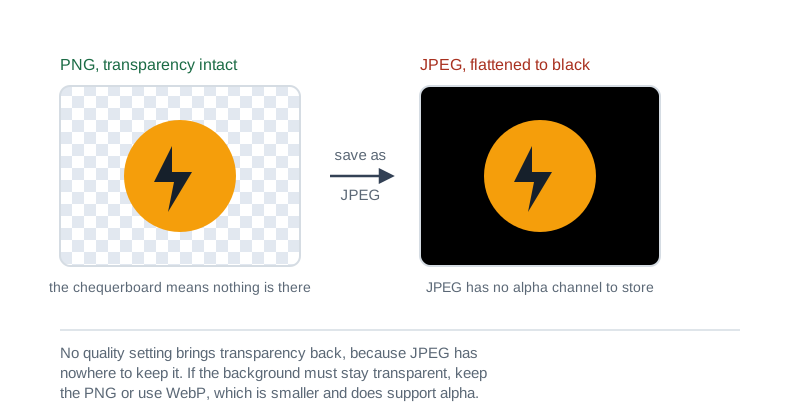
- This is the one that surprises people. PNG carries an alpha channel and JPEG does not, so anything transparent has to become a solid colour at the moment of conversion. A logo with a transparent background typically comes out on black, because that is what an empty alpha channel reads as.
- If the image needs a transparent background, JPEG cannot carry it at any quality setting. Keep the PNG, or convert to WebP, which is smaller than PNG and does support alpha.
- If the background is going to be white anyway, flatten it onto white first and the JPEG will look right.
Hitting a target file size
- Two dials control the size of a JPEG, and they work differently. Quality discards detail within the image, and dimensions reduce how many pixels there are to begin with.
- For a target like 200 KB, reduce dimensions first. A 4000 pixel wide photograph shown in a 1200 pixel column is carrying more than three times the pixels anyone will see, and no quality setting recovers the size as cleanly as simply not storing them.
- Then lower quality. Somewhere between 70 and 85 is usually indistinguishable from the original on a photograph, while below about 60 the artefacts around edges start to show.
Which format to convert to
Sizes are relative for the same image at visually similar quality. WebP is supported by every current browser, so the compatibility argument for JPEG is largely historical.
| Format | Lossless | Transparency | Relative size | Best for |
|---|---|---|---|---|
| PNG | yes | yes | largest | screenshots, logos, line art, anything with text |
| JPEG | no | no | small | photographs, where no edge is meant to be crisp |
| WebP | either | yes | smallest | almost anything destined for the web |
The rule of thumb: if the image contains text or sharp edges, do not convert it to JPEG. That is exactly what JPEG compression handles worst, and the softening does not come back.
Privacy & security
Images are converted locally.
Related tools
- Background Remover
Remove solid or green-screen backgrounds with chroma keying. tolerance and feather in your browser. Sample key from a pixel or choose a color.
Image Tools
- Image Compressor
Reduce image file size with quality and dimension controls. all in your browser.
Image Tools
- Image Cropper
Crop, rotate, and flip images with aspect ratio presets. Supports PNG, JPEG, and WEBP output with adjustable quality
Image Tools
- EXIF Metadata Remover
Strip EXIF, GPS, and other hidden metadata from photos before sharing them online: lossless for JPEG, batch zip download
Image Tools
- PDF OCR / Make Searchable
Recognize text in scanned PDFs using Tesseract.js, then extract it as plain text or rebuild a searchable PDF with an invisible text layer. All client-side.
PDF Tools
- Image to PDF
Combine images (PNG, JPEG, WebP) into a single PDF. Drag-drop, reorder, rotate, choose page size and fit mode. All in your browser.
PDF Tools
Frequently Asked Questions
Does WebP work in all browsers?
Encoding WebP requires browser support; if export fails, use PNG or JPEG.
Will transparency survive JPEG?
No. JPEG has no alpha; transparent areas may become flat color.
Is conversion private?
Yes. All canvas work stays local.
Does file size always shrink?
Not necessarily; PNG of a photo may be larger than a quality JPEG.
What about EXIF?
Some outputs may omit EXIF after re-encoding.
Why did my PNG turn black when I converted it to JPG?
Because JPEG has no transparency. PNG carries an alpha channel and JPEG does not, so anything transparent has to become a solid colour, and an empty alpha channel usually reads as black. Keep the PNG, or convert to WebP, which is smaller than PNG and does support transparency.
How do I get a JPG under 200KB?
Reduce the dimensions first, then the quality. A 4000 pixel wide photograph displayed in a 1200 pixel column carries more than three times the pixels anyone sees, and dropping those shrinks the file more cleanly than any quality setting. Then try quality around 75.
Should I use WebP instead of JPG or PNG?
For anything going on the web, usually yes. WebP is smaller than both at comparable quality, supports transparency like PNG, and every current browser reads it. The main reason to keep JPEG or PNG is a downstream tool that will not accept WebP.