QR Code Generator
Create QR codes for URLs, text, and more. Customize size and colors. Download PNG.
Interactive tool
What is a QR code?
A QR code stores text (often a URL) in a square barcode cameras can scan. Higher error correction lets codes remain readable when partially damaged or obscured.
How to use
- 1Type a URL or any short text.
- 2Adjust size and optional foreground/background colors.
- 3Generate and download the PNG.
Key features
Error correction
Pick L/M/Q/H balancing density vs robustness.
Brand colors
Set dark and light module colors (test scans before print).
Why generate QR codes locally?
Campaign URLs and internal tools should not be logged by third-party QR APIs. This generator uses qrcode.js only in your session.
Common use cases
- WiFi setup cards
- Event check-in links
- App store download links
What a QR code can hold
- The most common payload is a URL, but the format is just text, so a code can carry a plain message, an email address, a phone number, a wifi network with its password, a calendar event or a vCard contact.
- Capacity depends on what is encoded. Numbers pack tightest, then uppercase letters and a small symbol set, then arbitrary text. A short URL is comfortable; a whole vCard pushes the code to a much denser grid that needs a bigger print size to scan reliably.
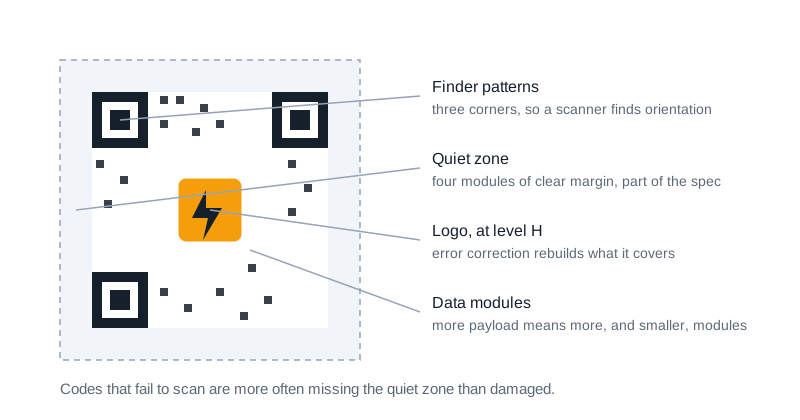
- Longer payload means more modules, and more modules means each one is physically smaller at the same print size. If a code will be printed small, keep the payload short.
Error correction, and why a logo needs it
- Every QR code carries redundant data so it still scans when part of it is dirty, creased or covered. There are four levels, and the table below gives the share of the code each can lose.
- Putting a logo in the middle works by deliberately destroying part of the code and letting error correction reconstruct it. That is why a code with a logo should be generated at level H: at level L the same logo takes out more than the code can recover.
- The trade is size. Higher error correction means more redundant modules, so the grid gets denser for the same payload.
No redirect in the middle
- Many free QR generators encode a URL on their own domain that redirects to yours. It lets them count scans, and it means your printed code stops working the day that service shuts down, changes its pricing or loses the domain.
- This generator encodes exactly the text you type. The code points straight at your URL, nothing is counted, and it will keep working long after this site is gone. That matters most for the codes that are expensive to reprint: signage, packaging, business cards.
QR error correction levels
Higher levels survive more damage but need more modules for the same payload, so the code gets denser at a given size.
| Level | Recoverable damage | Use when |
|---|---|---|
| L | about 7% | clean digital display, longest payload |
| M | about 15% | the usual default for print |
| Q | about 25% | labels that will be handled or scuffed |
| H | about 30% | a logo is placed over the centre |
Whatever the level, leave the quiet zone: the clear margin of at least four modules around the code. Codes that fail to scan are more often missing that margin than damaged.
Tips & best practices
Keep the payload short
Fewer characters means fewer modules, and fewer modules means each one is physically larger at the same print size. A short URL scans from further away than a long one.
Leave the quiet zone
A clear margin of at least four modules around the code is part of the specification. Codes that fail to scan are more often missing that margin than damaged.
Use level H if you add a logo
A logo works by destroying part of the code and letting error correction rebuild it. At lower levels the same logo takes out more than can be recovered.
Test with an actual phone, at actual size
Scanning from a monitor at 400 pixels proves nothing about a code printed 15 millimetres wide on a matte label.
Do not invert the colours
Scanners expect dark modules on a light background. Light on dark fails on many readers, and low contrast pairs fail on all of them.
Privacy & security
QR generation happens in your browser; content is not sent to Zap.Tools.
Related tools
- Unit Converter
Convert length, mass, temperature, volume, area, data storage, and speed using convert-units. locally in your browser.
Utilities
- Color Picker & Converter
Convert HEX, RGB, HSL, and CMYK. Check WCAG contrast between two colors.
Utilities
- Color Contrast Checker
Check WCAG 2.1 AA and AAA color contrast ratios for text and UI components, with live preview and accessible color suggestions
Utilities
- Percentage Calculator
Calculate percentages with seven modes: percent of, what percent of, increase/decrease, add/subtract percent, and percent difference
Utilities
- Lorem Ipsum Generator
Generate Lorem Ipsum placeholder text with custom paragraph, word, and byte counts
Text Tools
- Text Case Converter
Convert text between different cases: uppercase, lowercase, title case, camelCase, snake_case, and more
Text Tools
Frequently Asked Questions
Can I use custom colors?
Yes; test scanned codes before printing; extreme contrast helps readability.
Maximum length?
Very long strings increase module density; keep payloads concise.
Is generation private?
qrcode.js runs locally; nothing is sent to Zap.Tools.
What is error correction?
Higher levels add redundancy so partial damage or logos obstruct less data.
SVG export?
This tool exports PNG; vector workflows can trace externally if needed.